Key Takeaways:
- WhatsApp, Spreadsheets, and paper job sheets create visibility gaps, increase SLA risks, and slow down growth. Grounds maintenance businesses require structures and real-time systems for handling mobile teams efficiently.
- The right workforce management software should be able to solve real problems, such as multi-site scheduling, attendance tracking, SLA compliance, proof-of-work capture, and emergency job handling, not simply offer generic features.
- Seasonal workload fluctuations, recurring site visits, geo-tagged attendance, and mobile workforce coordination demand software developed specifically for field-based outdoor work.
- Decreased admin time, better staff utilisation, fewer SLA penalties, and enhanced client reporting directly affect profitability and long-term contract retention.
- The best solution supports growth for small teams, to large multi-site operations, while remaining seamless for field staff to use, ensuring operational efficiency and high adoption.
The Hidden Operational Risks of Manual Grounds Maintenance Management
The seamless operation of ground maintenance businesses relies on having clear visibility across sites, crew, and schedules. When work or operations take place outdoors or across various locations, depending on WhatsApp, spreadsheets, and paper job sheets become a liability rather than a solution quickly.
As the teams grow, these manual tools create gaps, such as delayed or missed site visits, lost job sheets, and a lack of real-time confirmation of attendance, all of which increase the risks of SLA breaches. One casual trimming or mowing visit can strain the relationships with clients and even threaten the long-term contracts. Emergency callouts, seasonal workloads, as well as remote sites just add to the pressure. After a certain point, spreadsheets and messaging applications just stop scaling. They lack real-time oversight, structured reporting, and proof-of-work.
This blog helps the ground maintenance business owners and operations managers understand what is important when choosing grounds maintenance management software UK. Thus, the decisions depend on compliance, operational control, and scalability, not just price or guesswork alone.
Why Grounds Maintenance Businesses Need Workforce Management Software?
Ground maintenance in the UK is very different from managing a static office team; your workforce is continuously on the move, operating multiple sites, managing unpredictable workloads, and requiring proof of work for clients. This is why traditional tools such as spreadsheets and WhatsApp reach their limits faster than your business evolves.
🔷 Multisite Job Allocation Complexity
Ground maintenance teams work in dozens of locations with varied visit frequencies and priorities. Workforce management software centralises the allocation of jobs, automatically scheduling recurring visits, and adjusting assignments with minimum admin effort. This decreases errors and ensures every site gets the required attention.
🔷 Mobile Workforce with no Fixed Location
With crews spread across estates, parks, and commercial sites, real-time visibility is important. A WFM system helps track teams in the field, allowing managers to confirm attendance, assign jobs, as well as communicate changes in the schedule immediately, without the endless guesswork or phone calls. This kind of oversight is not possible with manual tools.
🔷 Seasonal Workload Fluctuations
Maintenance needs to fluctuate with seasons, quieter in winters and busier in summer. Workforce management software adapts to these shifts automatically, enabling you to make plans for the peak periods, scale up crews, and handle emergency callouts without chaos.
🔷 Compliance & Proof-of-work Requirements
Clients largely expect documented proof of service. Workforce tools help in capturing timestamps, geo-tagged check-ins, and photos in real-time, deleting lost paperwork, and offer transparent records for both client reporting and internal use.
🔷 Client Expectations for Reporting & Transparency
Professional reporting develops trust. Automated dashboards as well as analytics show attendance trends, workforce performance, and SLA adherence, without hours of manual consolidation. This allows you to demonstrate value, retain clients, and handle expectations.
Key Challenges to Solve Before Choosing Any Software
Picking the right ground maintenance software in the UK needs shifting from feature hunting to problem-solving. Evaluating solutions relying on real-world operational bottlenecks ensures the software enhances efficiency despite adding an administrative burden.
Given below are the main challenges for solving before selecting a system, framed around the main operational problem.
🔶 Tracking Field Staff Attendance Accurately
The old sign-in sheets or trust-based systems are incorrect, prone to “buddy punching,” and cannot verify that the staff arrived at the job site on time.
🔶 Assigning Jobs Across Several Locations
Handling scattered sites results in scheduling conflicts, inefficient routing, and difficulty in finding the right personnel for urgent repairs.
🔶 Ensuring Tasks are Completed as per SLA
Without automated tracking, SLAs or Service Level Agreements are resulting in penalties, missed, poor client trust, and reactive, rushed repairs.
🔶 Capturing Proof of Work (Photos, Timestamps, Geotags)
Invoices are disputed, and client trust gets eroded when there is zero evidence that maintenance was actually performed or that a task took the amount of time claimed.
🔶 Handling Emergency or Ad-hoc Maintenance Requests
Urgent requests mostly disrupt routine maintenance, resulting in undocumented, chaotic, and inefficient dispatching.
🔶 Reporting to Clients Without Manual Effort
Generating performance reports requires hours of manual data entry, resulting in delays and inaccuracies, frustrating the clients.
Must-Have Features in Workforce Management Software for Grounds Maintenance
The right workforce management software goes beyond mere scheduling. For grounds maintenance, it should support mobile crews, multiple sites, proof-of-work, real-time tracking, and trustworthy reporting, allowing operational growth and control without manual chaos.
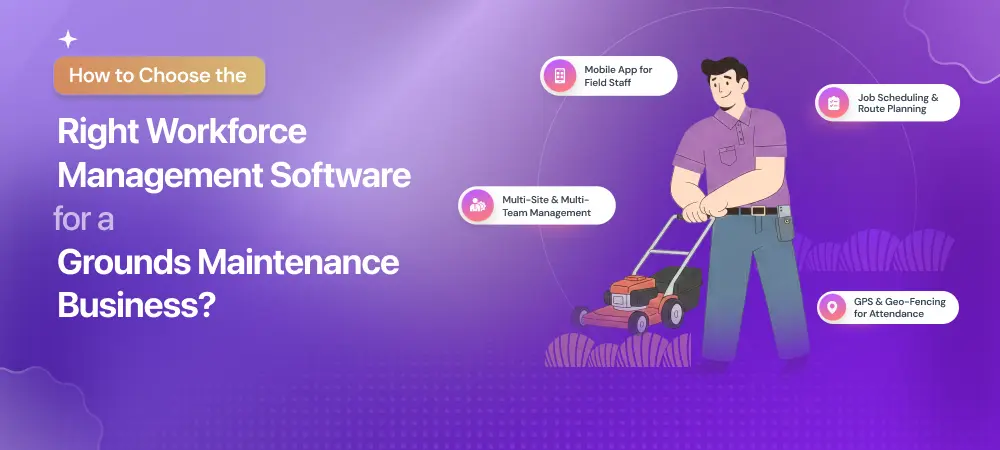
- Job Scheduling & Route Planning: Drag-and-drop scheduling allows the managers to assign tasks efficiently, automatically handle the recurring visits, and streamline routes based on proximity and crew availability, decreasing missed jobs and travel time. Real-time adjustments keep schedules perfect even when the priorities shift.
- Mobile App for Field Staff: A dedicated mobile app delivers check-ins, details, and messaging directly to the devices of the crew. Mobile access keeps teams informed, decreases calls and paperwork, and ensures field staff can independently work independently even without constant connectivity.
- GPS & Geo-Fencing for Attendance: GPS-based check-ins and geo-fencing confirm that crews are on-site at the right time and location. This helps in eliminating the guesswork, preventing false attendance entries and improving accountability, mainly important across remote grounds maintenance sites.
- Proof of Work Capture: Digitally capturing timestamps, photos, signatures, and notes directly on the job record offers verifiable proof of service. This is important for dispute resolution, client reporting, and SLA compliance without the manual collection of forms.
- SLA Tracking & Alerts: Automated alerts flag approaching missed visits, deadlines, and SLA risks. These notifications enable managers to act before minor issues become client complaints, supporting trustworthy service delivery and stronger client relationships.
- Multi-Site & Multi-Team Management: Tools should support multiple sites and crews with a centralised oversight. Managers are capable of viewing performance, schedules, and assignments across all locations from a single dashboard, which helps in simplifying planning and coordination.
- Client & Management Reporting: Built-in reporting helps in generating actionable insights on job completion, attendance, crew performance, and SLA compliance. Reports can be customised and exported for clients or internal review, saving hours of manual consolidation.
- Offline Access for Field Teams: Offline capabilities ensure field crews are capable of accessing schedules and capturing data even where the connectivity is not strong. Updates automatically sync online. This helps in preventing loss of data maintaining operations continuity.
Grounds Maintenance–Specific Questions You Must Ask Vendors
Not all the workforce management software is developed with grounds maintenance in mind. Before you commit to any particular platform, it is important to challenge the vendors with questions reflecting the practical, on-the-ground operations and not the generic feature claims. These questions help in separating genuine fit for purpose solutions from the tools that will create workarounds later.
1️⃣ Can the Software Handle Recurring Site Visits?
Grounds maintenance depends on repeat visits with several frequencies. The system should automatically generate jobs depending on contract schedules without manual re-entering.
2️⃣ Does it Support Seasonal Scheduling Changes?
Workloads dramatically shift between seasons. Ask how seamless schedules can be adjusted for winter reductions, summer peaks, or weather-driven changes.
3️⃣ Can Supervisors Monitor Multiple Sites in Real-time?
Supervisors require live visibility across locations for confirming attendance, site coverage, and job progress without constant site visits or calls.
4️⃣ How Does it Prevent Missed or Skipped Jobs?
Look for check-ins, automated alerts, and completion validations that flag risks before the SLAs are breached and not after.
5️⃣ Is Reporting Client-ready or Admin-heavy?
Reports should be seamless to generate, clearly structured, and perfect for client sharing without hours of manual formatting.
6️⃣ Can it Scale from 5 to 500 Field Staff?
The platform should grow with your business. It should be supporting the increasing sites, users, and complexity without a full system change.
Cost Considerations & ROI for Grounds Maintenance Businesses
Understanding the true cost of workforce management software is essential before making a decision. Pricing should be evaluated in the context of long-term operational value, not just monthly fees.
Most platforms price based on the number of active users, sites, and operational complexity. Businesses managing multiple locations, supervisors, or subcontractors may require advanced scheduling, GPS tracking, and reporting features, which can increase costs but also reduce operational risk.
Hidden Costs to Watch Out For
The advertised price rarely tells the full story. Customisation to fit real workflows, integrations with accounting or payroll systems, and staff training can add unexpected expenses. Poor onboarding or limited support can also increase reliance on manual workarounds, eroding value over time.
ROI Areas
- Reduced Administrative Work: Automating job allocation, attendance tracking, and reporting significantly cuts down manual admin. Operations managers spend less time chasing paperwork and more time managing service delivery.
- Fewer SLA Penalties: Real-time visibility and automated alerts help prevent missed visits and delayed tasks, reducing SLA breaches that can result in penalties or lost contracts.
- Better Staff Utilisation: Clear scheduling and workload visibility minimise idle time, unnecessary travel, and overtime, helping teams work more efficiently across sites.
- Improved Client Retention: Accurate reporting and consistent service build client trust. Transparency reduces disputes and strengthens long-term relationships. The right system delivers measurable returns, not hidden complexity.
Common Mistakes When Choosing Workforce Management Software
Choosing workforce management software is a long-term operational decision, not a quick tech purchase. Many ground maintenance businesses run into problems not because the software is bad, but because the selection process misses critical realities of field-based work. Avoiding these common mistakes can save time, money, and frustration later.
❇️ Choosing the Cheapest Option
Price pressure often pushes businesses towards the lowest-cost tool. While this may reduce upfront spending, cheap systems frequently lack essential capabilities such as SLA tracking, proof of work, or multi-site visibility. The result is continued manual effort, workarounds, and limited scalability, undermining the very reason for investing in software.
❇️ Overbuying Overly Complex Systems
At the other extreme, some businesses invest in enterprise-grade platforms packed with features they don’t need. These systems can be expensive, slow to implement, and difficult to customise for ground maintenance workflows. Complexity increases training time and often leads to low adoption across teams.
❇️ Ignoring Field Staff Usability
If field teams struggle to use the software, it won’t work, no matter how powerful it looks on paper. Complicated interfaces, slow mobile apps, or constant data entry frustrate crews and lead to poor compliance, incomplete records, and inaccurate reporting.
❇️ Not Testing Real Workflows
Many buyers rely on polished demos that don’t reflect day-to-day operations. Without testing real scenarios, recurring visits, weather disruptions, and emergency call-outs, you risk choosing software that performs well in theory but fails in practice.
❇️ Skipping Pilot Runs
Rolling software out across the business without a pilot phase is a costly gamble. Pilot runs help identify gaps, refine processes, and gather feedback from supervisors and field staff before full deployment. The right decision comes from realistic testing, not assumptions or feature lists.
Checklist: How to Choose the Right Software
Picking the right workforce management software does not have to be complicated if you have the right criteria in mind. The checklist is developed for helping ground maintenance businesses quickly assess whether a solution will actually support the everyday operations, field teams, and long-term growth.
▶️ Supports Grounds Maintenance Workflows
The software must be built for recurring seasonal scheduling, site visits, mobile crews, and outdoor work.
▶️ Easy for Field Staff to Use
A seamless, mobile-first interface is critical. If the crew cannot finish jobs, complete jobs, upload photos, or check in easily, the adoption and accuracy of data will suffer.
▶️ Strong Scheduling & Tracking
Look for the tools that can handle several multi-site scheduling, GPS tracking, real-time updates, and attendance verification without depending on manual follow-ups.
▶️ SLA & Compliance-ready
The system should be able to track deadlines, flag missed tasks, as well as capture proof of work automatically for supporting reports, audits, and client SLAs.
▶️ Scales with Business Growth
Whether you handle five or five hundred operatives, that software should scale without forcing a full change in the system later.
▶️ UK Support & Implementation
Local support, onboarding, and realization of UK compliance expectations make the implementation faster and decrease operational risk.
Final Thoughts
Picking the right workforce management system can transform how the ground maintenance business works. With proper visibility, accurate scheduling, and trustworthy service delivery. The right system decreases the burden of the admin, reduces SLA risks, as well as supports growth without adding to complexities. Despite chasing paperwork, tasks, or across each site. Solutions such as Tapapp show how ground maintenance workflows can be digitally managed. However, the real goal is choosing software that fits your business today and scales with you tomorrow.
Frequently Asked Questions
Digitisation helps in improving visibility, decreases paperwork, and helps in preventing mixed visits, as well as simplifying SLA compliance. It allows proof of work capture, real-time tracking, faster reporting, and improved coordination across crews and sites, resulting in more efficient operations as well as stronger client trust.
Choose software that supports multi-site contracts, strict SLAs, audit-ready reporting, transparency, and geo-tagged proof of work. Council requires trustworthy compliance tracking, consistent reporting formats, and clear service verification across public spaces.
Yes, modern ground maintenance management software integrates with payroll, accounting, and reporting tools or enables data exports. This ensures that the job flows seamlessly into invoicing, compliance reporting, and operational dashboards without duplicate manual entry.
If you handle multiple sites, depending on spreadsheets or WhatsApp, struggle with visibility, or face SLA related risks, it is a powerful sign. Software becomes important once manual coordination has started to cause issues such as delays, errors, or client dissatisfaction.
Absolutely. Efficient workforce management systems like Tapapp enable flexible user access for seasonal staff and sub-contractors, enabling attendance tracking, scheduling, and proof of work, without complicated setup or long-term user commitments.
Yes. Role-based access enables clients to view the status of the job, reports, as well as proof of work, without viewing operational data, enhancing transparent while maintaining control.
Premier workforce management systems in the UK, like Tapapp, support the existing SLAs by enhancing tracking and reporting. It strengthens compliance without needing contract changes.
Offline functionality enables crews to capture information, photos, and check-ins without connectivity. Data sync automatically as the signal is restored, ensuring zero loss of records.